Free tool
iPhone video size calculator
Type a length and a format to see how big the video is, how much video fits in your free space, or how much storage a few years of recording needs. The figures are Apple's, from iPhone Settings.
Runs in your browser. Nothing is uploaded. Everything on this page is worked out on your device. You can check it: the page makes no request when you use it.
Read it in Settings › General › iPhone Storage.
Our estimate, not Apple’s figure: about 30 GB. Apple puts iOS alone at about 12 to 17 GB. Enter what your phone uses apart from videos.
–
Estimated size, as recorded
Apple’s figures, in MB a minute
| Recording | High Efficiency (HEVC) | Most Compatible (H.264) |
|---|---|---|
| 720p, 30 fps | 45 | 60 |
| 1080p, 30 fps | 65 | 130 |
| 1080p, 120 fps | 190 | 340 |
| 4K, 24 fps | 150 | 270 |
| 4K, 30 fps | 190 | 350 |
| 4K, 60 fps | 440 | High Efficiency only |
| 4K, 120 fps | 800 | High Efficiency only |
Source: Apple, Settings › Camera, iOS 27.1, read 29 October 2026. Emptie’s bit rates: CompressionSettings.swift (provisional).
Worked example
A 10-minute video of 4K at 60 fps, as recorded: 4.4 GB. As a Balanced copy: 614 MB, 86% less.
The short answer
A minute of 4K video at 60 fps takes about 440 MB on an iPhone in High Efficiency, the format iPhone records in by default. A minute of 1080p at 30 fps takes about 65 MB. These are Apple’s own estimates, shown in Settings, and the calculator uses them. It also works out how big Emptie’s copy of a video would be, and the smallest iPhone storage that holds a few years of recording.
Size of a video
- Enter the length. Minutes and seconds, as the video shows in Photos.
- Pick the recording format. The same choices as Settings › Camera › Formats.
- Read the size. The gauge shows the video as recorded. The rows show Emptie’s copy at each Preset.
Apple prints the size of a minute under the list of formats. Open Settings, tap Camera, then Record Video. The text under the list estimates the size for the format you pick.
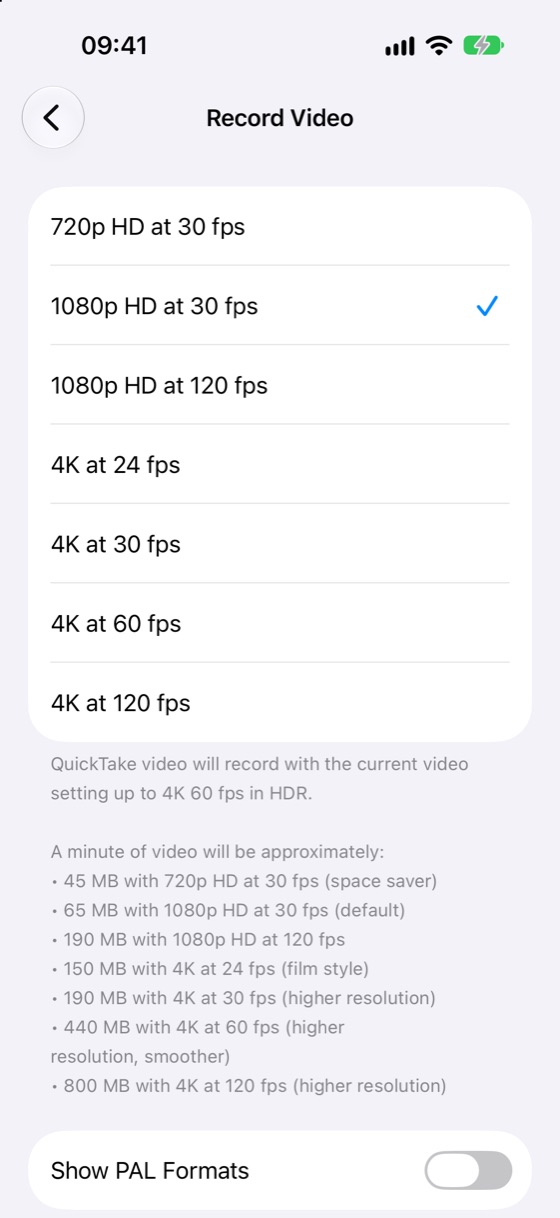
Emptie’s copies are sized by bit rate. Each Preset has one: High Quality is 4K at 16 Mb/s, Balanced is 1080p at 8 Mb/s and Max Savings is 1080p at 5 Mb/s. A copy never gets bigger than its original. A video whose copy would save less than about 20% is already efficient, and Emptie leaves it alone.
How many hours of video is 128 GB?
Choose What fits and enter your free space in GB. You can read it in Settings › General › iPhone Storage. Divide the free space by the size of a minute, and you have the minutes. At 4K and 60 fps, 128 GB of free space holds about 291 minutes, which is 4 hours 51 minutes. As Emptie’s Balanced copies, the same space holds about 2,083 minutes, or 34 hours 43 minutes.
Free space is less than the storage size
Apple’s tech specifications say the space available is less than the capacity, and it varies. Read the free space on your own phone rather than using the size on the box.
How much storage do I need on my iPhone?
Choose Storage I need. Enter how many minutes you record a month, how many years you want to keep them and the space for iOS, apps and photos. The total is the videos plus that space. The calculator then gives the smallest iPhone storage that holds it. Tick the box to see what keeping the videos as Balanced copies saves.


256 GB vs 512 GB iPhone
Three years of one hour a month of 4K at 30 fps is 2,160 minutes, about 410 GB of video. Add 30 GB for everything else and you need 440 GB, so the 512 GB iPhone. Kept as Balanced copies, the same videos take about 133 GB, and the total is about 163 GB, which fits the 256 GB iPhone.
The estimate for iOS, apps and photos is ours, not Apple’s. Apple’s iPhone 14 Pro tech specifications say a standard setup uses about 12 to 17 GB, and apps and photos vary. Type in your own figure from Settings › General › iPhone Storage.
The sizes come from Apple’s iPhone 17 Pro tech specifications, which list 256 GB, 512 GB and 1 TB.
How the numbers work
- Apple’s figures are in megabytes a minute. A gigabyte is 1,000 megabytes, as Settings counts.
- Size as recorded is the length in minutes times Apple’s figure for the format.
- A copy’s size is the Preset’s bit rate plus 192 kb/s of sound, times 7.5 MB a minute for each megabit per second, and never more than the original.
- Apple’s own figures depend on the scene. Busy footage with lots of motion takes more.
- The bit rates are the ones in Emptie’s app, which are provisional and may change.
Frequently asked questions
Is the calculator exact?
No. Every result is an estimate. It uses Apple’s figure for the format, so a real video can differ, most of all when the footage is busy.
Does the calculator upload my videos?
No. It works out the numbers on your device. You type in a length and a format, and the page sends no request while you use it.
Why does a 4K video take more than I expected?
Apple’s figures for 4K at 60 fps are about 440 MB a minute in High Efficiency, more than six times 1080p at 30 fps. Frame rate matters as much as resolution. Compressing the video brings it down to the Balanced figure.
How much storage do I need on an iPhone?
Multiply your minutes a month by the months you keep them, then by the megabytes a minute for your format. Add the space for iOS, apps and photos, and choose the smallest size that holds the total. The calculator does the sum for you.
Related guides
Figures checked on