Compressed video lost its date or location? Fix it
A new copy of a video can show today's date and lose its location, albums, Favorite and Hidden status, because the new file may not carry those details. Check the copy's info in Photos, fix a date or place by hand, and choose a method that copies them across.
On this page
The short answer
A compressed copy is a new file. If the app that made it does not carry over the details of the original, the copy can show the day it was saved instead of the day it was recorded. It can also lose its location, and it may sit outside the albums, Favorites and Hidden status the original had.
You can fix a date or a place by hand in Photos. You can’t rebuild an album membership that was never copied, so the method you use matters most. Emptie is built to copy those details across. Below, we show how to check your own copy and which methods keep the details.
Key Takeaways
- A copy saved as a new file can show the day it was saved, not the day it was recorded.
- Open a copy’s info in Photos to see the date, location and albums it kept.
- Photos lets you adjust a date or location by hand, and you can revert the change.
- Only 7 of 888 apps we checked mention keeping albums, favorites or hidden status.
- Emptie copies the date and time, location, Favorite, Hidden status and albums, and tells you before the first replacement what it can’t carry over.
Why the copy shows today’s date
Photos files a video by the time it was recorded. That time, and the location, are stored in the video file itself. Apple’s guide to location metadata says that when Location Services is on for the Camera app, the coordinates are “embedded into each photo and video” (Apple Support, Manage location metadata in photos, published September 2026).
A compressed copy is a new file made by re-encoding the video. If that file does not carry the recording time, Photos has no date to show for it. Photos may then date it by the day it was added to the library. That is how an old holiday clip can appear at the top of your library under today’s date.
Albums, Favorite and Hidden status are kept by Photos in the library, not in the video file. A new copy starts out in no albums and without those marks, unless the app that made it puts them back.
Check what your copy kept
Before you decide what to fix, check the copy against the original. Open the copy in Photos and swipe up, or tap the info button, to see its details. Apple’s guide to viewing this information is See photo and video information on iPhone, which we checked on 29 October 2026.
Then check each detail against the original:
| Detail | Where to look | What a good copy shows |
|---|---|---|
| Date and time | Info panel | The day and time the video was recorded |
| Location | Info panel, with a map | The place it was recorded |
| Favorite | Favorites album | The copy is there if the original was |
| Hidden | Hidden album | The copy is there if the original was |
| Albums | Each album you use | The copy is in the same albums |
If a detail is missing, you can fix a date or a place by hand, as the next section explains. For albums, Favorite and Hidden status, you add the copy to the album or mark it again yourself.
Fix a date or location by hand in Photos
Photos lets you change the date, time and location stored with a video. Apple’s guide to the video’s information covers this (See photo and video information on iPhone). The steps are:
- Open the video in Photos, then tap the More button (three dots) at the top.
- Tap Adjust Info, then tap Adjust Date & Time to change the date and time, or Adjust Location to change the place.
- Set the date, time or location, then confirm.
- To undo the change, open the same menu and tap Revert.
To change several videos at once, tap Select, tap each video you want to change, then follow the same steps.
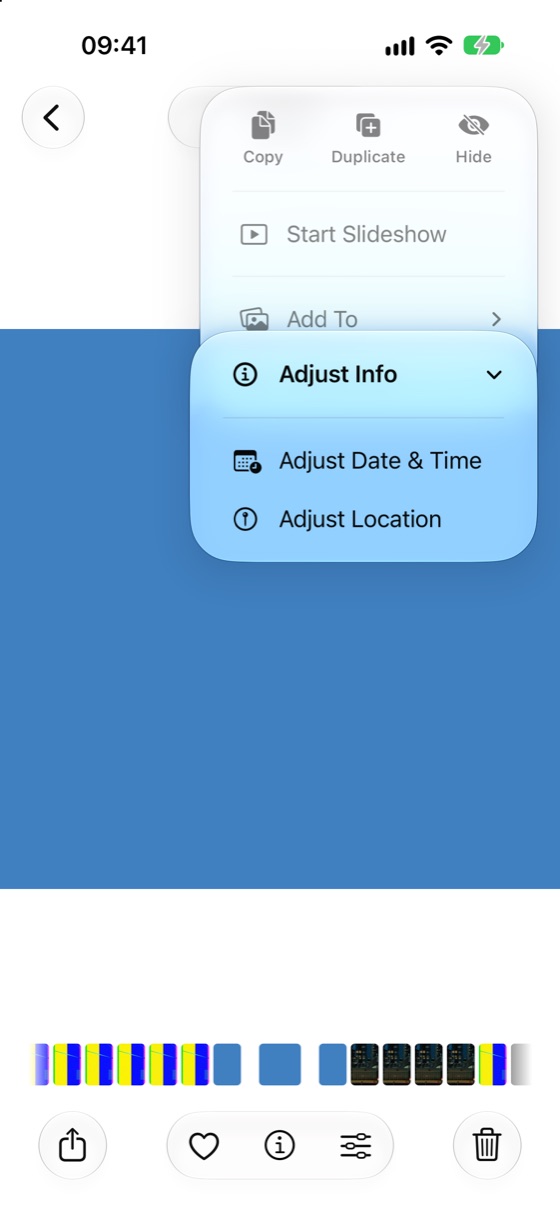
This is the menu in iOS 27.1. If your phone runs iOS 26 and the names differ, look for the same items in the video’s info panel. Emptie needs iOS 26 or later.
Changing a date by hand fixes what Photos shows. It does not bring back an album, Favorite or Hidden status the copy never had. For those, add the copy to the album, or mark it as a Favorite or Hidden yourself.

Which methods keep the details
Each method below handles the file in a different way, so each keeps different things.
Keeping the same file. If a video is sent or stored as it is, nothing is rewritten, so its details are left as they were. That keeps the original, but it does not make a smaller copy. Only a re-encoded copy has to rebuild its details.
Sharing with location. When you share a photo or video, the location can go with it. Apple’s guide says to select the item, tap the share button, tap Options, and turn off the Location switch to stop the location being shared (Apple Support, Manage location metadata in photos). Turning the switch off protects the place. It does not tell you whether a date or album came across.
Re-encoding apps. An app that compresses a video writes a new file, and whether it keeps the details is up to the app. We checked 888 storage and video apps on the US App Store on 23 October 2026. Only 7 of them mention keeping albums, favorites or hidden status through a change, and 3 of those 7 are storage cleaners (Do iPhone cleaner apps work? Data from 888 apps). Most listings say nothing about it, so you can’t tell from the store page what a copy will keep.
Apple’s own compression. Apple’s guide to compressing a video on iPhone, published 29 July 2026, shows how to save the result to your library or to Files (Apple Support, Compress a video on iPhone). It does not say whether the date, location, albums, Favorite or Hidden status are kept. So check the copy with the steps above before you rely on it.
Whichever method you use, check the first copy before you do more. The how-to guide for compressing video on iPhone lists the built-in routes, with their trade-offs.
What Emptie carries over, and what it doesn’t
Emptie is a free iPhone app that compresses videos in your Photos library on the phone and replaces the originals. It copies these details to the compressed copy:
- the date and time the video was recorded, with its time zone
- its location
- Favorite and Hidden status
- the albums it was in
It can’t carry over face tags, Memories or Shared Album links. Emptie tells you this once, before the first replacement. It also skips some videos altogether: Slo-mo, Cinematic and Spatial videos, videos that are only in iCloud, videos that would shrink by less than about 20%. Videos in albums you protect can’t be selected at all.
Emptie deletes an original only after its compressed copy is saved to the library and checked. The check covers whether the copy plays, whether its length matches, and whether its details arrived. Before anything is replaced, Review lets you compare each copy with its original, and you can keep any original you like.
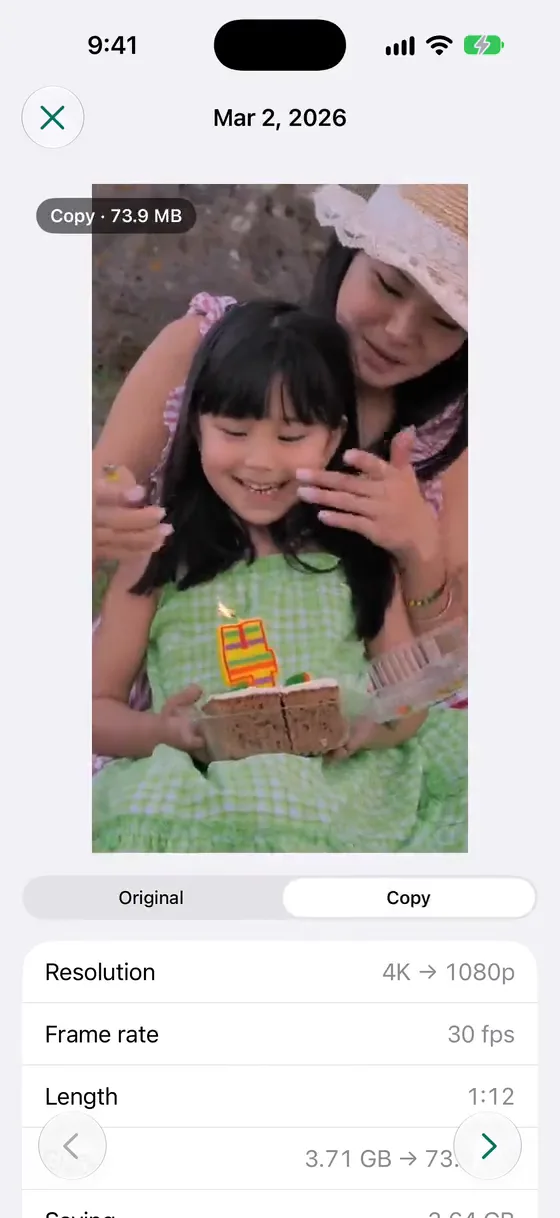
Emptie’s list is what it is built to copy. Check the first copy you make in Photos, using the steps above, before you replace a library. The original stays in Recently Deleted for 30 days after a replacement, so you can restore it if something is wrong.
Frequently asked questions
Why does my compressed video show today’s date?
A compressed copy is a new file. If that file doesn’t carry the recording date, Photos has no recording date to show, so the copy takes the day it was added to the library. Open the copy’s info in Photos to check, and use Adjust Date & Time to set the right date.
Can I restore the original date on a copy I already made?
Yes, by hand. Open the copy, tap Adjust Date & Time, and set the date and time you know it was recorded. If the original is still in Recently Deleted, you can restore it instead, since it keeps its own date. It then sits beside the copy, so delete the copy if you no longer want it. Deleted videos stay in Recently Deleted for 30 days, as why the space doesn’t come back after deleting videos explains.
Does Emptie keep the date, location and albums?
Yes. Emptie copies the date and time recorded, the location, Favorite and Hidden status, and the albums the video was in. It can’t carry over face tags, Memories or Shared Album links, and it tells you that before the first replacement.
How do I remove the location from a video I share?
Before sharing, tap the share button, tap Options, and turn off the Location switch. To remove the location from the video in Photos, open it, tap the More button, then tap Adjust Info, Adjust Location and No Location (Apple Support, Manage location metadata in photos, published September 2026).